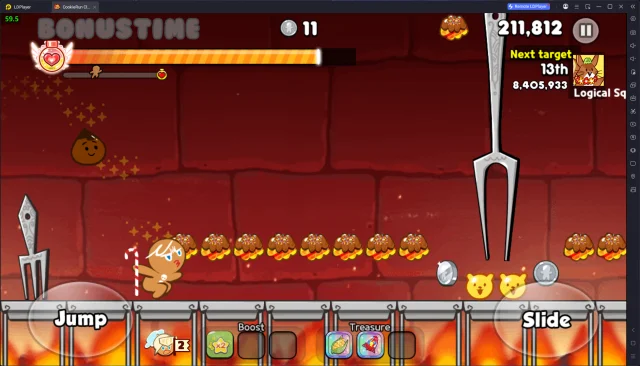
CookieRun Classic(은)는 Devsisters Corporation(이)가 개발한 어드벤처 앱입니다. 그러나 최고의 Android 에뮬레이터인 LD플레이어를 사용하면 컴퓨터에서 CookieRun Classic(을)를 다운로드하고 즐길 수 있습니다.
컴퓨터에서 CookieRun Classic(을)를 실행하면 보다 큰 화면에서 이용할 수 있으며, 마우스와 키보드로 앱을 이용하는 것이 화면을 터치하는 것보다 훨씬 빠릅니다. 동시에 기기의 배터리 문제에 대해 걱정할 필요가 없습니다.
다중 인스턴스 및 멀티 컨트롤 기능을 통해 컴퓨터에서 여러 애플리케이션과 계정을 동시에 이용할 수도 있습니다.
또한 파일 전송 기능을 통해 이미지, 비디오 및 파일을 공유하는 것도 매우 쉬워집니다.
컴퓨터에서 CookieRun Classic(을)를 다운로드하고 실행하여 큰 화면과 고화질의 PC 환경에서 즐기세요!
Get ready for a sweet escape adventure with the cutest Cookies!Eat Jellies, avoid obstacles and escape the Witch's Oven!
■ The origin of the CookieRun series, loved by 300 million players worldwide
Help the Cookies escape the oven and go on exciting adventures in the Cookie world!
■ Casual running action with super simple controls
Jump & slide - two buttons are everything you need to get running!
■ Exclusive K-Culture Cookies
Meet Cookies inspired by Korean culture and cuisine, only in CookieRun Classic!
■ Ever new Cookies, Pets, and Treasures!
Collect your favorite Cookies and Pets, then Upgrade your Treasures for even more powerful combinations!
■ Hone your running skills in real-time competitions!
Wanna be the very best? Enter the League and compete with players around the world for the highest score!
■ Rookie runners always welcome!
Get a head start with special events and buffs just for new players!
-----
Terms of Service:
https://policy.devsisters.com/en/terms-of-service
Privacy Policy:
https://policy.devsisters.com/en/privacy
Parental Guide:
https://policy.devsisters.com/en/parental-guide/
-----
[Permissions info]
Required permissions:
none
Optional permissions:
- Notifications: Informations about game status and events
- Tracking: Personalized ads and service analytics
Manage permissions:
- Settings > Apps > CookieRun > Notifications > Allow notifications on/off
- Settings > Apps > CookieRun > Allow tracking on/off
-----
Help and support:
You can reach customer service by going to https://cookierun.zendesk.com/hc/en or from the game via Game Settings > Game Info > Support / Probabilities
-----
Official Instagram:
https://www.instagram.com/crclassic_en
Official X:
https://x.com/CRClassicEN